
Everything your mission trip needs, in one app.
Team messaging, the day's schedule, a live team map, shared photos and files, and a translator that works with no signal. One place for the whole trip — so leaders can spend less time coordinating and more time ministering.
Free for every participant. iOS · Android · Web — works offline.
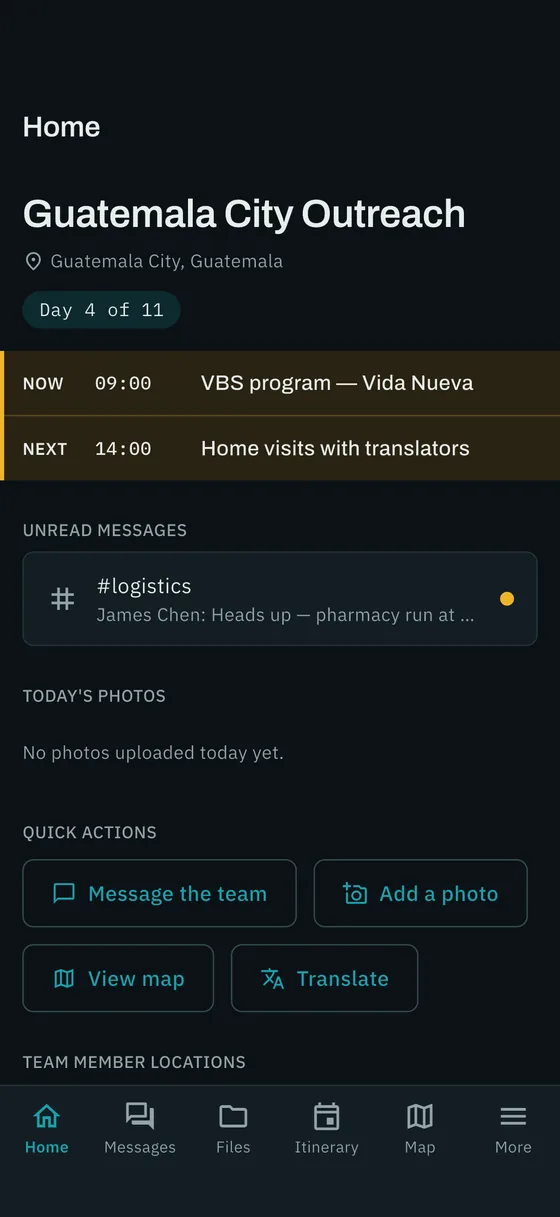
The whole trip, in everyone's pocket.
Each piece is built for the realities of a mission trip: mixed ages, unfamiliar places, and bad or no connectivity.
Team messaging
Organized channels for the whole team, direct messages, @mentions, quick polls — and an announcements channel only leaders can post in, so important info never gets buried.
Live itinerary
The day's schedule in destination time, with "now" and "next" always one glance away. Change the plan once and everyone sees it instantly — with a reminder before each event.
Devotionals & journals
Schedule each day's devotional with readings and files attached. Everyone reflects in their own journal and marks it done — and leaders can follow along with how the team is growing.
Team surveys
Build a quick form — short answers, multiple choice, rating scales — and send it now or schedule it for before or after the trip ends. Debriefs and feedback collect themselves.
Live team map
See where your team is at a glance, with the places that matter pinned: lodging, the meeting point, the hospital, the embassy. Opt-in, team-only, deleted when the trip ends.
Photos & files
Waivers, packing lists, and the whole team's photos in one shared library instead of scattered across ten phones. Pin anything for offline.
Built-in translator
Type, translate, and have it spoken aloud. Download a language before you leave and it works with no signal at all.
Trip assistant
"What's next?" "Where's the closest pharmacy?" Answers come from this trip's own schedule, roster, files, and the area around you.
Works offline
Schedule, files, roster, places, and cached messages stay available without signal. Anything you write offline sends itself when you're back online.
Simple invites & roles
Send a link or share one invite code. Admins, team leaders, and team members each see exactly what they need — and you can rename roles to match your church's language.
A record that lasts
When the trip ends, the schedule, messages, and photos are preserved read-only as the story of what happened — and location data is deleted automatically.

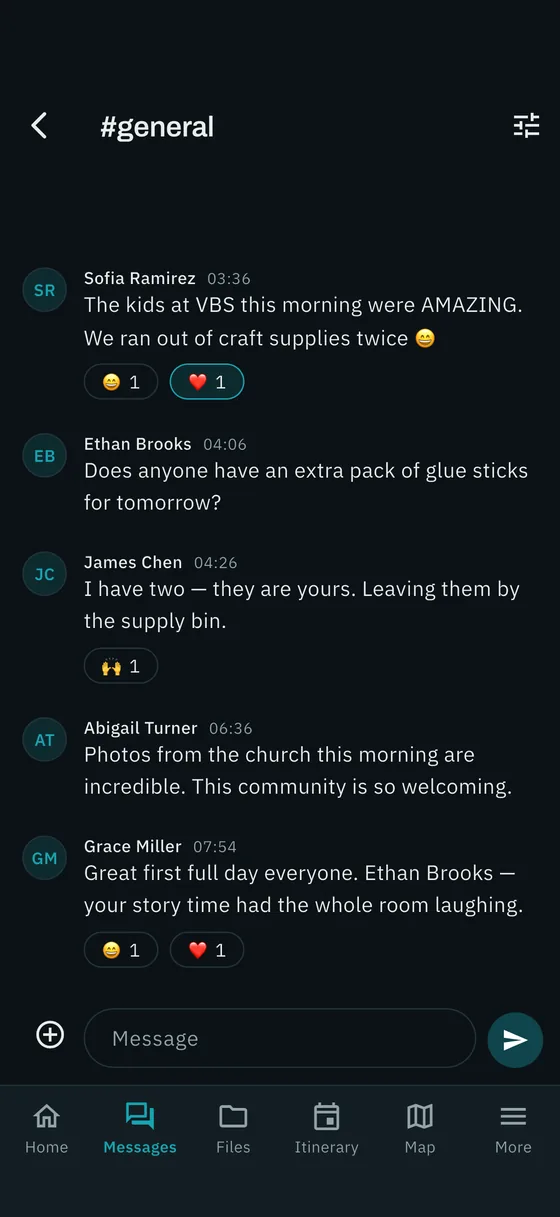
One announcement reaches everyone, once.
Channels keep logistics, prayer requests, and the inside jokes in their own lanes. Announcements are leader-only, so the 6 a.m. departure change doesn't get buried under forty photos of dinner.
- Direct messages to leaders; member-to-member DMs are a leader's choice
- Quick polls for the small decisions
- Notifications batched so phones don't buzz forty times
- Photos sent in chat land in the trip library automatically
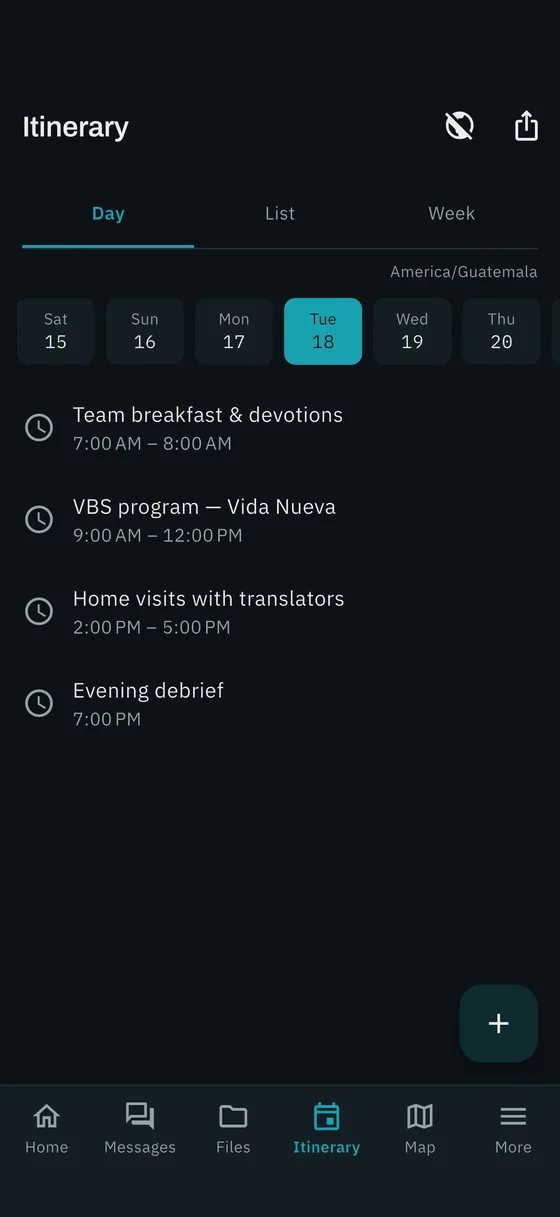
Change the plan once. Everyone sees it instantly.
Every time shows in the destination's local time, so nobody does the math. Reminders fire on each phone before each event — even without signal.
Build the week on the web console · import a spreadsheet · export to any calendar
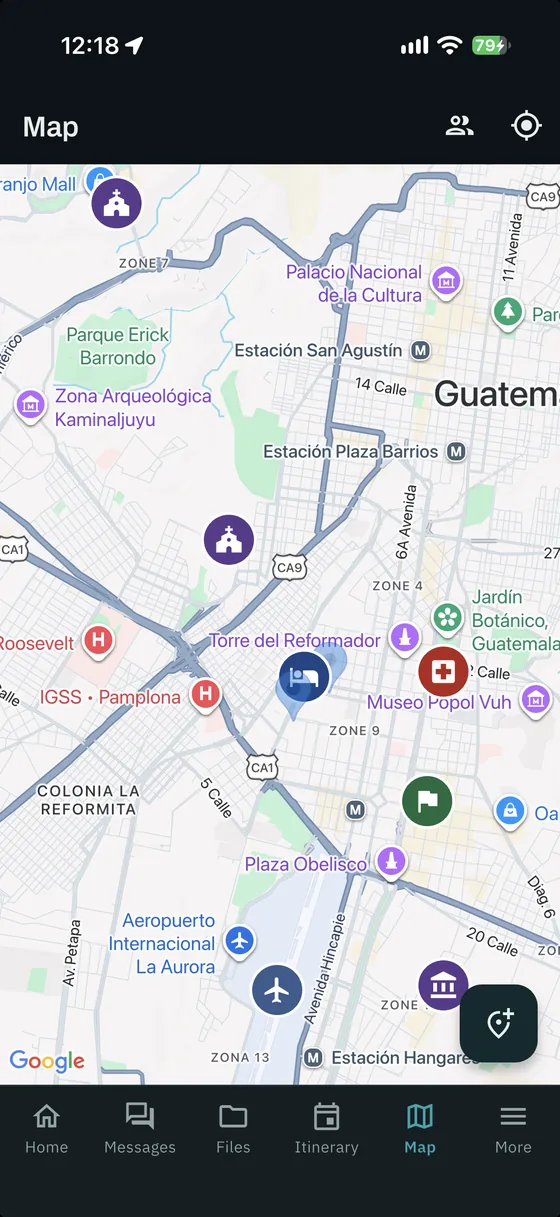
No one gets left behind at the market.
Peace of mind in unfamiliar places. Leaders pin the places that matter; team members share their latest position while the app is open.
- Opt-in for every participant, with a trip-wide kill switch for leaders
- Latest position only — no movement history, ever
- Every location record is deleted automatically when the trip ends
- Offline: a saved area map and the full list of places
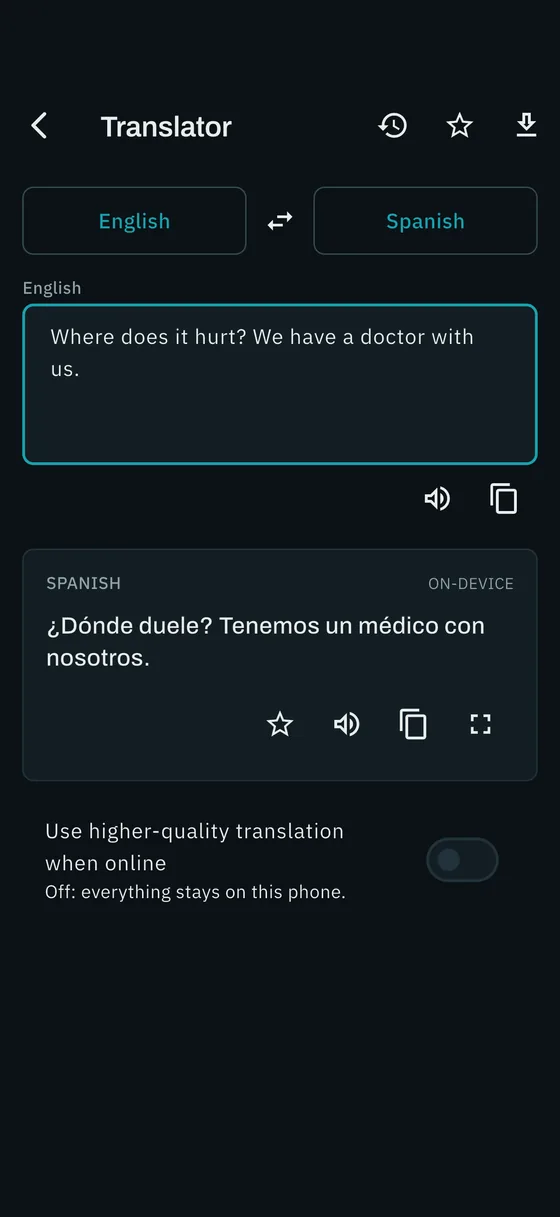
Talk to anyone, anywhere — even with no signal.
Download a language pack before you leave and translate on the device itself. Online, it switches to higher-quality cloud translation automatically. Tap to hear it spoken aloud.
- Dozens of languages, roughly 30 MB each
- History and favorites stay on the phone — never uploaded
- Flip the direction with one tap and hand the phone over
Plan it on your computer. Run it from your phone.
Trip coordinators do the heavy lifting from a browser — before the trip and during it. Whatever you change on the console appears on every phone instantly.
Invites & roster
Email invite links or hand out one invite code. Watch who's accepted, promote a leader in a click, export the list for your files.
Drag-and-drop week
Build the week on a grid, copy a day when it repeats, import the spreadsheet you already have, send it to anyone's calendar.
Files & places
Drag waivers and packing lists straight in. Drop pins for the hotel, the church, the hospital — your team sees them on their phones.
Switch things off
Turn off any part of the app a trip doesn't need, decide who can DM whom, and rename roles to your church's own words.
Ask the trip
Ask anything about this trip and get answers from the real schedule, roster, and files.
Clean endings
End the trip and everything becomes a read-only record; members are released to join the next one.
Set up in an afternoon. No accounts to create by hand.
Create the trip
We set up your church's organization. You add a trip in the web console — name, destination, dates, time zone — and start building the schedule.
Invite the team
Email invite links, or tell everyone to download the app and type in one invite code. Volunteers of any age are in within a minute, signing in with Apple or Google.
Run the trip
Announcements, schedule changes, photos, the map, the translator — all from the phone. When it's over, end the trip and keep the record.
A tool for the team — not a tracking app.
Parents and participants should be able to trust it. We built the boundaries in.
Location is opt-in, foreground-only
Each person chooses. Sharing works only while the app is open, shows the latest position only, and is visible solely to their own trip team.
Deleted when the trip ends
Every location record is purged automatically the moment a trip ends. No history is ever kept.
No ads. No data sales. No tracking.
No advertising, no analytics profiles, no data brokers. Photos have their location data stripped on upload.
Private by invitation
Nobody can join a trip without an invite from its leaders. Content is visible only to that trip's team and the church staff who run it.
Leaders stay in control
Leaders decide who can post announcements, who can message whom, and which features a trip uses at all.
Honest about limits
Mission Minded is a coordination tool, not a safety system. Keep your head counts and buddy systems — we just make the rest a lot easier.
Simple, per-trip pricing. Nothing per person.
Mission Minded is priced per trip, not per seat — simple enough to put in a trip budget. It's always free for participants, free to plan, and you aren't charged until a trip actually starts.
Every trip includes
- Every feature in the app, for the whole team
- The web console, with unlimited coordinators
- Generous photo and file storage
- Free planning — set up the trip and invite the team at no charge; cancel before it starts and it costs nothing
- A read-only record of the trip when it's over
Get a quote for your church
Tell us a little about your trips — how many a year, roughly how big the teams are — and we'll send pricing and set up your organization.
Contact us for pricingWe'll also walk your coordinators through the console so the first trip starts smoothly.
Frequently asked
Does it cost anything for participants?
No. Participants download the app for free and join with an invite link or code. The trip fee is paid by the church that runs the trip.
Does it work without cell service or Wi-Fi?
Yes — that's what it was built for. The schedule, files, roster, places, and recent messages are stored on the phone. Anything you write offline is sent automatically when a connection returns. Download a translator language pack before you go and translation works with no signal at all. The live map needs a connection to update positions, but the saved area map and place list stay available.
Does it handle fundraising or donations?
No, and on purpose. Mission Minded does everything after the fundraising — planning, communication, and running the trip itself. It works alongside whatever you already use for support raising.
Is it on both iPhone and Android?
Yes. The app is on the App Store and Google Play, and the planning console runs in any desktop browser. A team can mix devices freely.
How do people join a trip?
Leaders send an invite by email, or everyone downloads the app and enters a single invite code. People sign in with Apple, Google, or an email and password — no accounts for leaders to set up by hand.
What about youth and minors?
Mission Minded is for adult and youth participants invited by their organization; the church obtains any parental consent its own policies and local law require. Accounts are never created for children under 13. Location sharing is always opt-in.
Where does our data live?
On Google Cloud in the United States. There are no ads, no data sales, and no behavioral profiles. Read the privacy policy for the full picture.
What happens when the trip ends?
The trip becomes a read-only record — schedule, messages, and photos stay exactly as they were — and every location record is deleted. Team members are freed to join their next trip.
Can we try it before committing?
Yes. Creating a trip, inviting the team, and building the schedule are free. You're only billed when a trip's start date arrives — so set one up and kick the tires.
Less coordinating. More ministering.
Download the app for your team, or open the console to start planning the next trip.
See Mission Minded with your team in mind.
Leave your details and we'll reach out to set up a quick walkthrough of the app and the planning console.